
Peasoup have created a tool to allow you to migrate data into the platform from any external S3 service*
It is designed to simplify the process and provide visibility of the status of the replication.
This tool is available upon request.
Requesting access to the Migration tool
To request access to the Migration Tool, please log into your S3 account via https://portal.peasoup.cloud
Under the support
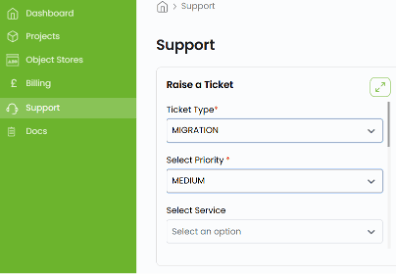
Select Ticket Type “MIGRATION”
Set your priority, summary and a brief description of the amount of data you are in migrating into the platform.
Upon receipt of the ticket our engineers will create a URL specifically for your use for the duration of your migration.
Using Migration Tool
Upon receiving the URL, which should be from within the support ticket, you can connect to the migration service.
The URL will look like the following:
https://customerA.migrate.peasoup.cloud/login?token=a0e74817aa60ff687213124b7b720ee8139f
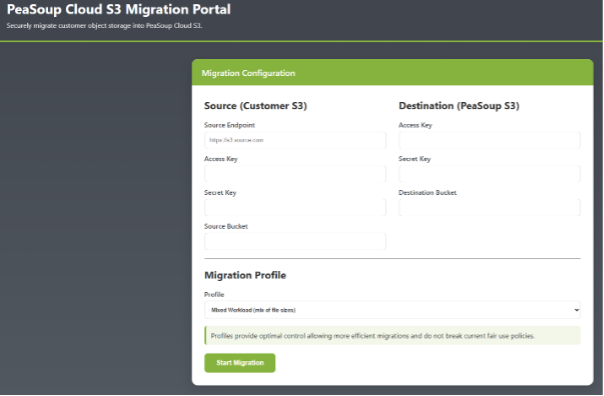
Clicking the link will result in the following page:
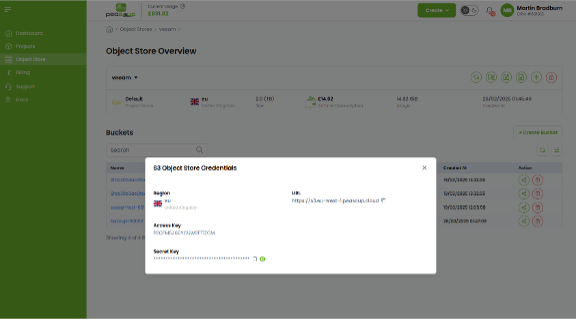
Log into your PeaSoup Cloud portal and navigate to the ‘Object Store’ section. From here, open the credentials for your storage project to find your access key, secret key, and the S3-compatible endpoint URL.
Here you can enter the source information for where your data is coming from and the destination information.
The profile is used to select identify the type and size of objects, listed as Small, Mixed and Large. This helps optimise the performance of inbound transfers.
Please note that only the bucket name is required for the destination.
Clicking Start Migration begins the transfer
You are then presented with a status page as follows:
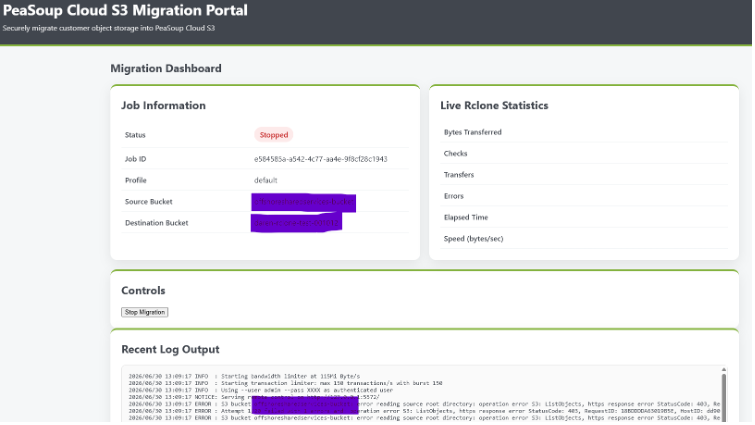
This will show transfer rate, errors and log output for the duration of the transfer.
Should you close the browser you can return to it using your original URL and /status as below:
https://customera.migrate.peasoup.cloud/status
You can stop the transfer at any time, but please note this will not be able to be restarted at this time and the information will have to be re-entered on the front page to begin transfer.
Upon completion of the tansfer it will show number of files completed and checks performed, you can use this to compare against your source bucket.
You URL will be held and available to you for 2 days after your transfer is complete. After this time the URL will be removed and logs will be deleted.
Should you have any issues during this process, please contact support.
*This is an inbound migration tool only, if you are looking to migrate your data away from Peasoup, please use the destination provider’s tool/method