
What Is Infrastructure as a Service (IaaS)
Infrastructure as a Service (IaaS) - What It Is, How It Works & Key Use Cases
Infrastructure as a Service (IaaS) is a form of cloud computing that delivers fundamental IT infrastructure—such as compute, storage, and networking—over the internet on a pay-as-you-go basis. Instead of buying and maintaining physical servers and data centres, organisations can rent the resources they need from a cloud provider and scale them up or down as required.
IaaS is one of the core cloud service models and is widely used by businesses that want flexibility, control, and cost efficiency without the operational burden of managing physical hardware.
How Does Infrastructure as a Service (IaaS) Work?
IaaS works by virtualising physical data centre resources and making them available to customers through an online interface or API.
Here’s how it typically operates:
Physical infrastructure
The cloud provider owns and manages the physical servers, storage systems, networking equipment, and data centre facilities.Virtualisation layer
Using hypervisors and software-defined technologies, physical resources are abstracted into virtual machines (VMs), virtual networks, and virtual storage.Self-service access
Customers provision and manage resources through a web portal, CLI, or API—often in minutes rather than weeks.Usage-based billing
You only pay for the resources you consume (e.g. CPU hours, storage capacity, network traffic).
With IaaS, customers retain control over operating systems, applications, security configurations, and data, while the provider manages the underlying hardware and facilities.
IaaS Architecture and Related Components
A typical IaaS architecture is made up of several key components working together.
1. Compute
Virtual machines (VMs)
CPUs and memory
GPU support for high-performance or AI workloads
2. Storage
Block storage (for databases and applications)
Object storage (for backups, archives, and unstructured data)
File storage (shared file systems)
3. Networking
Virtual networks and subnets
Firewalls and security groups
Load balancers
VPNs and private connectivity options
4. Virtualisation and Orchestration
Hypervisors (e.g. KVM, VMware)
Automation tools for scaling and provisioning
APIs for infrastructure management
5. Security and Management
Identity and access management (IAM)
Monitoring and logging
Encryption and compliance controls
This modular architecture allows IaaS platforms to be highly scalable, resilient, and customisable.
Common IaaS Use Cases
IaaS is suitable for a wide range of workloads and industries. Typical use cases include:
1. Website and Application Hosting
Organisations use IaaS to host websites, APIs, and business applications with full control over the environment.
2. Backup, Disaster Recovery, and Archiving
IaaS provides cost-effective storage and compute resources for backups, off-site replication, and disaster recovery environments.
3. Development and Testing
Developers can quickly spin up test environments without impacting production systems or investing in hardware.
4. High-Performance and Compute-Intensive Workloads
Ideal for analytics, AI/ML, rendering, simulations, and batch processing workloads.
5. Compliance and Data Sovereignty
IaaS allows organisations to choose where their data is stored and how it is secured—critical for regulated industries.
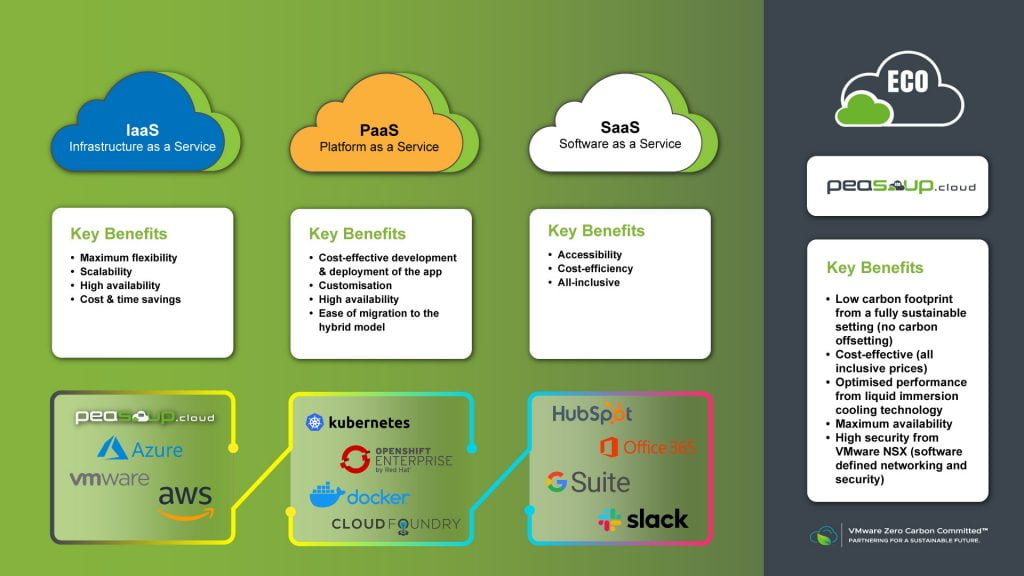
These three cloud models differ mainly in who manages what.
Infrastructure as a Service (IaaS)
You manage – OS, middleware, applications, data
Provider manages – physical infrastructure
Best for – flexibility, control, custom environments
Platform as a Service (PaaS)
You manage – applications and data
Provider manages – OS, runtime, infrastructure
Best for – developers who want to focus on code, not infrastructure
Software as a Service (SaaS)
You manage – usage and configuration
Provider manages – everything else
Best for – ready-to-use applications (e.g. email, CRM, collaboration tools)
In short:
IaaS = maximum control
PaaS = faster development
SaaS = minimal management
IaaS vs. Other Cloud Services
IaaS is often compared with other cloud deployment and service models.
IaaS vs. Private Cloud
IaaS – shared infrastructure, elastic scaling, lower upfront costs
Private cloud – dedicated infrastructure, higher control, higher cost
IaaS vs. Bare Metal
IaaS – virtualised, flexible, scalable
Bare metal – physical servers, maximum performance, less flexibility
IaaS vs. Managed Cloud Services
IaaS – customer manages OS and workloads
Managed cloud – provider takes responsibility for maintenance, monitoring, and optimisation
Many organisations adopt a hybrid approach, combining IaaS with managed services or private infrastructure depending on workload requirements.
Why Businesses Choose IaaS
Organisations adopt Infrastructure as a Service because it offers:
Lower capital expenditure (no hardware purchases)
Rapid deployment and scalability
Greater control than higher-level cloud services
Improved resilience and availability
Support for modern, cloud-native and legacy workloads
For businesses looking to modernise IT while maintaining control, IaaS provides a strong foundation.
Summary
Infrastructure as a Service (IaaS) is a cornerstone of modern cloud computing, giving organisations the freedom to build, scale, and operate IT environments without the limitations of physical infrastructure. By understanding how IaaS works, its architecture, and how it compares to other cloud models, businesses can make informed decisions about their cloud strategy.